Choose Threat Modeling when you want a structured view of how an application could be attacked and what controls should reduce that risk. It is especially useful early in a design or review, or when repository context and business workflows matter more than a standard vulnerability list.
#Before you start
Threat Modeling requires a ready application with repository access. Add the repository that matches the application, and make sure Tahr can read the selected branch. Add application documents when they contain useful product, architecture, workflow, or security context.
Supported application documents include PDF, Markdown, text, DOCX, JSON, YAML, and image files. Keep documents relevant to the application and remove them when they are no longer appropriate.
#Start the assessment
- Open Assessments and choose New assessment.
- Select the application.
- Select Threat Modeling.
- Review the repository and application-document context shown by Tahr.
- Resolve any readiness messages, then start the assessment.
Threat Modeling can use the repository and documents attached to this application. It does not require test users for authenticated testing. When Tahr shows source or recon context as available for a workflow, review the date and scope before relying on it; do not assume every assessment uses those results.
#Read the result
Open the completed assessment in the Threat Modeling workspace. Use the application and assessment selectors to choose the result. At the top, open the Summary and Key Risks disclosures for an overview before reviewing the workspace sections.
The workspace has five sections:
- Actions
- Threats
- Attack Paths
- Coverage
- Report Details
Use search on the list sections to find relevant items. In Threats, switch between Priority threats and All threats, and sort by Report order or Evidence high to low.
Open an item from a list to review its details and evidence. Permitted users can comment on items, set their review status, and close or reopen them.
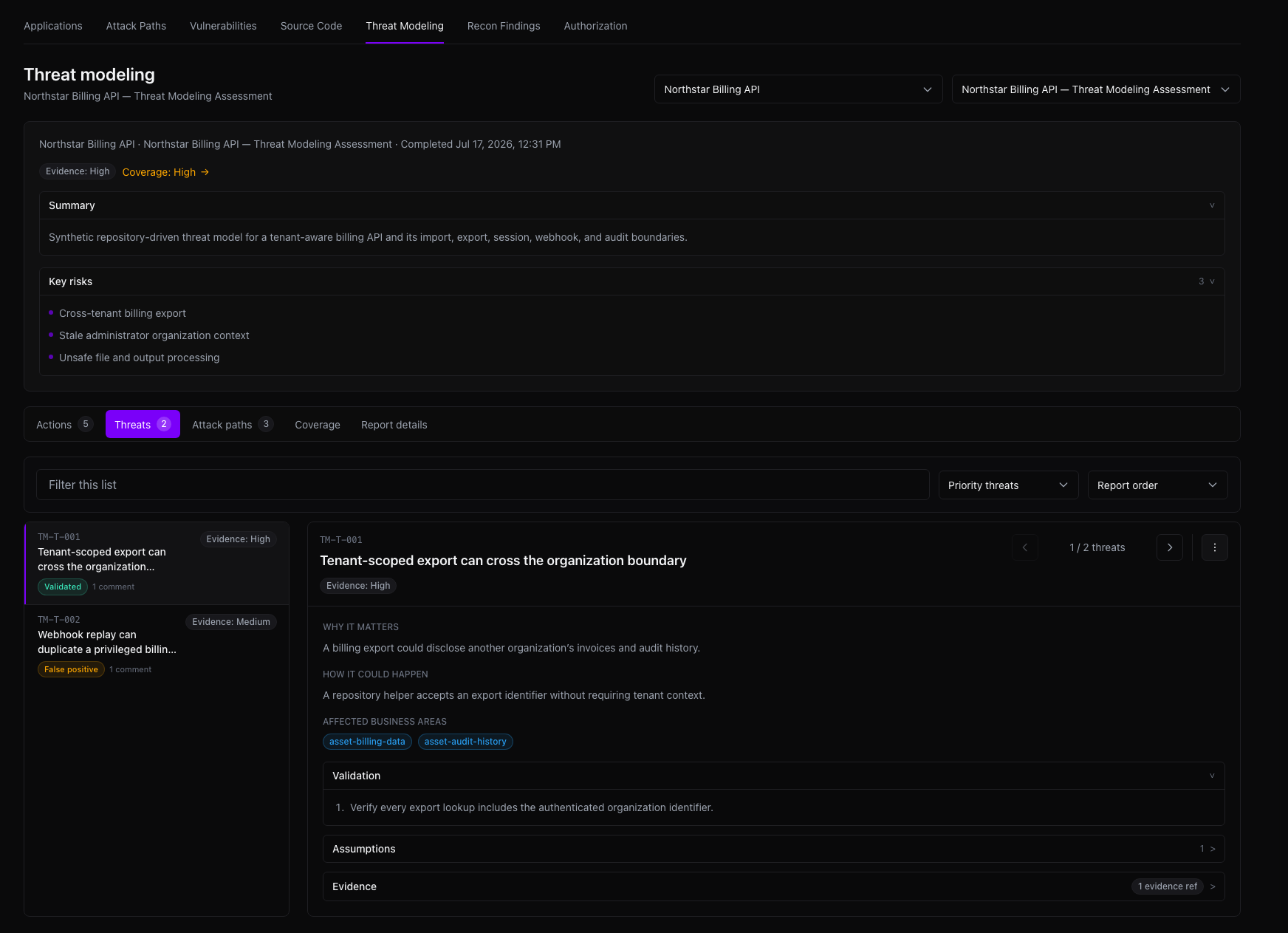
The result can include:
- Threats and why they matter.
- Assumptions and limitations that affect confidence.
- Evidence references and application context.
- Attack paths showing how weaknesses could combine.
- Recommended actions and practical validation steps.
Treat recommendations as review guidance. Confirm important claims against the repository, documents, and product behavior.
#Threat Modeling versus other outputs
Threat Modeling is a separate workspace and output focused on risks, trust boundaries, assets, attack paths, assumptions, and mitigations. Normal Findings are individual issues produced by security assessments and their evidence. Standard Reports summarize supported assessment results; they do not replace the Threat Modeling workspace.
If the assessment cannot start, check repository access, application readiness, and document availability. If the completed result is unavailable, retry from the assessment workspace and contact Tahr support with the visible message if the problem continues.